

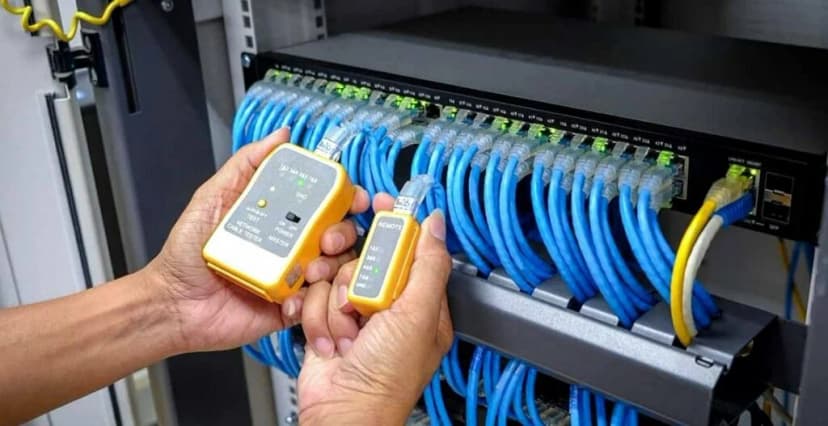
A smooth, speedy network feels like magic, but behind that magic is a maze of cables hidden in ceilings, walls, and server racks. If those cables are sloppy, you’ll notice slow internet, dropped video calls, and panicked “Why is the Wi-Fi down?” messages. The solution starts with hiring the best voice and data cable installer.
In the same way you wouldn’t let a hobbyist wire your office’s electrical system, you don’t want an unproven crew handling the nervous system of your business: the data network. A true professional knows how to plan routes, label every port, test every line, and leave your office tidy enough to impress even the pickiest fire marshal. That expertise pays off in faster speeds.
Chapter 1: Why Hiring the Right Installer Matters
Setting up your business’s internet and network isn’t just about plugging in some wires and hoping for the best. It’s way more important than that! Whether you’re running a small office or a growing company, the quality of your cable installation can make or break your daily operations. That’s why hiring the right installer is one of the smartest choices you can make.
Let’s explain why it matters so much and what could go wrong if you don’t.
What Can Go Wrong With a Bad Installation?
Slow Internet & Dropped Connections
Ever had a video call freeze or your Wi-Fi randomly stop working? That could be because of messy or incorrectly installed cables. Weak or broken connections mean your internet won’t run as fast or as smoothly as it should. That’s bad news when your team needs to download files, host meetings, or keep cloud apps running.
Security Risks
Loose or exposed cables aren’t just ugly, but could be dangerous. They can make it easier for your system to be hacked or damaged. Bad cable work might also leave your equipment open to outside interference. That’s a big risk if you’re dealing with private customer data or important company information.
Expensive Repairs Later
Cutting corners during installation might save a few bucks today, but it could cost a lot more down the road. Fixing a poorly installed network means pulling up cables, reinstalling them properly, and maybe even shutting down your business while it gets fixed. That’s time and money you shouldn’t have to waste.
What a Professional Installer Brings to the Table
Hiring a trained and certified voice and data cable installer means you can relax. These folks know exactly what they’re doing and make sure your setup works the way it should.
Faster, More Reliable Connections
With the right cables installed correctly, your network runs smoothly. That’s super important for tools like:
VoIP (Voice over Internet Protocol) – for clear phone calls
Cloud-based apps – like Google Drive or Microsoft 365
Video meetings – with zero buffering or dropped calls
No lag. No dropped signals. Just solid performance you can count on.
Future-Proof Network Setup
A good installer doesn’t just think about today. They plan. What if your business grows next year? Or you bring in new tools and tech? A pro will design your network with that in mind. They’ll install scalable, high-speed cables like Cat6, Cat6a, or fiber optics to handle whatever the future brings.
Compliance With Industry Standards
Have you heard of TIA/EIA, OSHA, or local building codes? Don’t worry. You don’t need to memorize them, but your installer should definitely know them. Following these rules means your network is safe, legal, and ready to support your business long-term.
Chapter 2: How to Find the Best Cable Installer
So, how do you find the right installer? Here’s a simple guide to help you choose someone who knows their stuff and won’t leave you dealing with connection problems down the line.
1. Look for Specialized Experience
Not all electricians or techs are trained in structured cabling, which is the method used to organize and install cables in commercial spaces. Just because someone knows how to set up Wi-Fi at home doesn’t mean they can handle a large office or data center.
Here’s what to check for:
They Focus on Business Networks
Look for installers who regularly work with offices, warehouses, schools, or hospitals. Business setups require more planning, more cables, and stronger equipment than a basic home network.
They Understand Fiber Optic Services
If your company plans to stream, host video calls, or rely on cloud storage, fiber optics may be essential. Make sure your installer has experience with fiber installation, splicing, and termination, especially if speed is a priority.
They Know Cat6 and Cat6a Cabling
Installers should be comfortable working with high-speed Ethernet cable types like:
Cat6 – Great for most current business needs.
Cat6a – Better for high-bandwidth or longer-distance applications.
Ask: “Have you installed Cat6a or fiber in business environments before?” Their answer will tell you a lot.
2. Check Certifications & Training
You want a team that’s been trained, tested, and knows what it’s doing, not someone who winged it on the job.
BICSI Certification
This is one of the most respected certifications in the cabling industry. A BICSI certification means that the holder has undergone proper training and passed exams focused on structured cabling standards.
Manufacturer Certifications
Big cabling brands like Panduit, Leviton, and CommScope offer their own certifications. These show that the installer knows how to use their products correctly, which can even affect warranty coverage.
If your installer is manufacturer-certified, it often means longer warranties and better performance guarantees.
OSHA Safety Compliance
Safety is no joke, especially in bigger buildings. Make sure the team follows OSHA guidelines so they can work safely around ladders, power tools, and ceiling spaces. You want pros who care about doing it right and doing it safely.
3. Read Reviews & Ask for References
Online reviews are like a sneak peek into someone else’s experience. Before making your decision, take some time to see what past clients have to say.
Check Google and Yelp Reviews
Look for patterns. If lots of people mention:
Showing up late
Cutting corners
Disappearing after the install
That’s not a good sign.
On the other hand, if you see reviews that highlight clear communication, quick problem-solving, and long-term reliability, that’s a company worth investigating.
Look for Case Studies or Portfolios
Reputable installers often have photo galleries or stories on their website showing projects they’ve completed. These might include:
Corporate offices
Retail stores
Schools or colleges
Medical or dental facilities
Reading through these helps you see if they’ve done work that’s similar to what you need.
Ask for Business References
It’s okay to ask: “Can I speak with one or two of your recent business clients?” If the installer is proud of their work, they’ll be happy to connect you with someone. A quick phone call with a past client can tell you a lot more than a star rating ever could.
4. Compare Pricing & Warranties
We get it, budget matters. But when it comes to network installation, cheaper isn’t always better.
Be Careful With the Lowest Price
If one company’s quote is much lower than everyone else’s, ask why. It could mean they’re:
Using low-quality cables that won’t last
Skipping essential equipment like patch panels or grounding
Not including testing or certification reports
Not offering any warranty (so you’re stuck with repair costs later)
Saving a little now can cost you a lot more in the future if you need to rip everything out and do it again.
Look for Transparent Pricing
A good installer will give you a clear quote that includes:
All materials
Labor
Testing
Cleanup
Support options
Make sure they don’t hide extra fees in the fine print.
Ask About Warranties
A proper installation should come with a warranty on both labor and materials, usually lasting 1 to 5 years. This protects you if anything fails due to poor installation or bad parts.
If they won’t offer a warranty? That’s a sign to walk away.
Chapter 3: Questions to Ask Before Hiring
Before you hire anyone to install your network, you absolutely have to ask the right questions.
Just like you wouldn’t hire someone to fix your car without knowing their background, you shouldn't hire a cable installer without ensuring they know what they’re doing.
Let’s break it down, question by question.
1. “What Types of Cabling Do You Specialize In?”
This might sound like a technical question, but it’s super important. Different businesses need different kinds of cables. Maybe your office needs Ethernet cables for high-speed internet, or perhaps you need fiber optics if your team handles huge files and lots of video meetings. Some companies also need PoE (Power over Ethernet) for things like security cameras or smart lighting.
If the installer stumbles on this question, that’s a red flag.
What You Want to Hear:
“We work with Cat6 and Cat6a cables for fast, wired connections.”
“We install fiber optic lines for high-performance networks.”
“We’re experienced with PoE for devices like VoIP phones and security systems.”
If they only know about basic home internet or older cable types, they’re probably not ready for your business setup.
2. “Do You Provide a Free Site Survey and Quote?”
Imagine ordering clothes online without checking your size. That’s what it’s like hiring a cable installer without a site visit.
A site survey is when the installer visits your office to understand the layout, walls, floors, power sources, and any existing network gear. This helps them create a plan and give you an accurate price estimate.
Why It Matters:
Every building is different. Some offices have raised floors, some don’t. Some need long cable runs between rooms. Without seeing your space, there’s no way to know how much work is involved or how much it’ll cost.
What You Want to Hear:
“Yes, we always perform a free site visit before quoting.”
“We’ll assess the space and recommend the best cable types and setup.”
If they skip this step or try to guess over the phone, that’s not professional.
3. “What Certifications Do Your Technicians Hold?”
Cabling might seem like a simple job, but there’s a lot of training involved, especially for business-level installations. The best installers stay updated with the latest standards and safety rules.
Here’s what to look for:
BICSI Certification
This stands for Building Industry Consulting Service International. BICSI-certified techs know how to handle data networks the right way.
Manufacturer Certifications
Some brands like Panduit, Leviton, or CommScope train techs to install their products correctly. If an installer is certified by a manufacturer, that means they’ve passed tests and know the products inside and out.
OSHA Safety Training
This one’s all about safety. OSHA certification shows that installers follow safety guidelines on job sites, which is especially important in larger buildings or commercial zones.
What You Want to Hear:
“Yes, our team has BICSI-certified technicians.”
“We’re certified to install equipment from major cable brands.”
“All our staff are OSHA-trained for safe work environments.”
If they dodge the question or say “we just learn on the job,” that’s risky.
4. “Can You Share Examples of Past Business Installations?”
Experience matters. You want someone who’s done this before, not someone who’s going to experiment with your office.
Ask them to show proof of past work, especially for businesses like yours. It's a big plus if they’ve worked in offices, data centers, medical clinics, or retail stores.
What You Want to Hear:
“We installed Cat6 cabling for a local law firm.”
“Here are photos from a data center job we completed last month.”
“We’ve worked with clinics and understand how to wire for patient privacy and security.”
Don’t be shy about asking for references or case studies. Good installers are proud of their work and happy to show it off.
5. “Do You Offer Maintenance & Emergency Support?”
Once your network is installed, you still want to know someone has your back. Things happen, cables wear out, devices fail, or connections drop. Having ongoing support means you won’t be left on your own when problems pop up.
What You Want to Hear:
“We offer maintenance packages for regular checkups.”
“If there’s a problem, we provide emergency support within 24 hours.”
“We monitor performance and handle upgrades as needed.”
If they say “we just install it and leave,” think twice. You deserve support beyond Day One.
Chapter 4: Network Cable Installation Tips
This section gives you helpful tips that professional installers swear by. Knowing these things will help you make better decisions and ask smarter questions, even if you're not installing yourself.
Plan for the Future (Because Growth Happens!)
Your business might be small today, but what about next year? Or the year after that? One of the biggest mistakes people make is installing just enough cabling for their current setup without thinking about what’s coming.
Install Extra Conduits and Cables
Conduits are the tubes or channels that carry cables through walls, floors, and ceilings. If you only install the exact amount you need right now, you will regret it when you hire more people, bring in new machines, or move desks around.
Adding extra conduits and pull strings lets you easily add more cables later, without tearing open walls again.
Also, consider pulling a few extra cables (called “spares” or “dark cables”) during your initial install. These can be quickly connected later if new devices need wiring.
Use Higher-Grade Cables From the Start
It might be tempting to save a few bucks using older cable types like Cat5e, but trust us, it’s not worth it. Technology moves fast, and you need cables that can handle tomorrow’s internet speeds and data loads.
Go for:
Cat6 – Good for most office needs today.
Cat6a – Better if you plan to stream video, use cloud apps heavily, or want more speed over longer distances.
Fiber Optic – Best for super-fast, long-distance connections and future-proofing.
These cables can handle more data, faster speeds, and longer runs—perfect for growing businesses.
Keep Your Cables Neat and Organized
Messy cables don’t just look bad; they create confusion, make troubleshooting harder, and can even cause connection issues. Proper cable management keeps everything working well and helps you avoid future chaos.
Use Labeled Patch Panels
A patch panel is like a control hub for your network. It’s where all the cables from around your building come together. Labeling each cable at the panel (and at the device end too!) helps you know what goes where.
That way, if there’s a problem with one desk or device, you can find the exact cable instantly instead of guessing.
Avoid Sharp Bends and Tight Bundles
Cables might look flexible, but bending them too sharply or bunching them together tightly can actually affect their function.
Why it matters:
Sharp bends can damage the internal wires and reduce performance.
Tight bundles can cause crosstalk (interference between cables), especially in data-heavy environments.
Installers should follow proper bend radius guidelines and use Velcro straps (not zip ties) to loosely group cables. This keeps the signal strong and your network stable.
Don’t Skip the Testing Phase
You wouldn’t buy a car without starting the engine, right? The same goes for your network cables. Before calling the job “done,” professional installers always test the cables to make sure everything works exactly as it should.
Run Speed and Continuity Tests
Speed tests check whether your cables deliver the speeds they’re supposed to. For example, if you’re using Cat6 cables, you should be able to handle Gigabit speeds.
Continuity tests check whether the signal flows through the entire cable correctly from one end to the other: no breaks, shorts, or missing connections.
These tests help catch problems before they cause real trouble.
Get Certification Reports
A professional installer should provide you with certification reports. These reports are like scorecards for your cables. They show that each cable meets the required industry standards, such as TIA/EIA performance specs.
These reports come in handy:
When you need to prove your network is up to code.
If there’s ever a performance issue, and you want to confirm the cabling isn’t the problem.
For insurance or compliance audits, especially in industries like healthcare, finance, or tech.
If an installer doesn’t offer testing or certification? That’s a big warning sign.
Bonus Tips From the Pros
Here are a few extra nuggets of advice that experienced installers use all the time:
Map Out Device Locations First
Before installing a single cable, create a floor plan showing where all computers, printers, phones, cameras, and Wi-Fi points will go. This helps you avoid running cables to the wrong places and keeps things efficient.
Leave Slack, But Not Too Much
It’s good to leave a little extra cable at the ends (called a service loop) in case you need to adjust or move equipment. But too much slack can turn into tangles and make cable trays messy.
Use Quality Hardware
Patch panels, keystone jacks, faceplates, and cable trays should all come from trusted manufacturers. Cheap gear wears out faster and causes connection issues. You don’t want your internet going down because of a flimsy jack.
Don’t Forget About Wi-Fi Access Points
Even if most of your devices are wired, you’ll still want good Wi-Fi. Plan ahead for where to place wireless access points and run cabling to support them. These often use PoE (Power over Ethernet), so ask your installer to include those runs.
Chapter 5: Where to Find "Voice and Data Cable Installation Near Me"
So, you’ve learned what makes a great cable installer. You know what to ask, what to avoid, and what your network needs. Now the big question is: Where do you find one?
Whether you’re moving into a new space or upgrading your current network, finding a trustworthy, local installer doesn’t have to be stressful. In fact, it’s easier than ever if you know where to look and what steps to follow. This chapter walks you through smart, simple ways to find voice and data cable professionals near you.
1. Search Online Directories
One of the fastest ways to find local services is to use online tools. Most people start with Google, and for good reason. It shows what’s nearby, includes maps, ratings, and photos, and often gives you a sense of how professional the installer really is.
Google Maps
Open Google Maps and type something like:
"business network cable installation near me" or
"commercial data cabling services [your city]"
What to look for:
High ratings (ideally four stars or above)
Lots of positive reviews
Clear descriptions that mention Cat6, fiber optic, PoE, or structured cabling
Photos of past work or office setups
If you see terms like “residential only” or “TV mounting,” they’re probably not your best bet for commercial jobs.
Angi (formerly Angie’s List) or HomeAdvisor
These websites let you search for service pros based on your project type and location. The best part? You can filter by commercial installers, check their verified reviews, and see if they’re licensed and insured.
These platforms often give you instant quotes or let you request one from multiple providers at once. This saves time and makes comparing your options easier.
2. Ask for Recommendations
Sometimes, the best way to find a reliable installer is to talk to someone who’s already hired one. Word-of-mouth is powerful, especially when it comes from people you trust.
Local IT Companies
Reach out to IT service providers in your area. Many of them partner with cable installers for network setup, repairs, or upgrades. Ask them:
“Do you have a cabling partner you recommend?”
“Have you worked with any structured cabling companies in town?”
They’ll usually be happy to point you in the right direction, especially if they’ve seen great results themselves.
Join Local Business Networking Groups
Check out:
Your local Chamber of Commerce
LinkedIn Groups for business owners in your area
Facebook Groups focused on small business tips or tech support.
These are great spaces to ask, “Has anyone worked with a voice and data cabling installer you’d recommend?” You’ll often get multiple responses, with pros, cons, and tips based on real experiences.
3. Verify Licensing & Insurance
Before you hire anyone, it’s important to double-check that they’re legally allowed to do the work and that they’re covered in case something goes wrong.
General Contractor License
In many states, voice and data installers must have a general contractor’s license or a low-voltage license. This means they’ve passed tests, met legal requirements, and can work on building infrastructure.
How to check:
Ask for their license number
Look it up on your state’s contractor licensing website.
If a company hesitates to provide this, that’s a red flag.
Liability Insurance
Let’s say the installer accidentally drills into a water pipe. Or drops a ladder onto your server. You don’t want to be stuck with the bill.
Make sure the installer carries:
General liability insurance (protects against property damage)
Workers’ comp insurance (protects you if someone gets injured on your site)
Ask to see proof. Any professional will have no problem sharing this with you.
Final Thoughts: Invest in a Reliable Installer
It’s tempting to just go with whoever is closest, cheapest, or answers the phone first, but your business network is too important to risk on a random choice.
Here’s why choosing a professional cable installer is always worth it:
What You Avoid With a Bad Installer
Frequent network failures that slow down your work
Expensive reworks when corners get cut
Security risks from exposed or outdated wiring
What a Great Installer Gives You
Faster, more secure connections for internet, phones, and cloud apps
Long-term cost savings by doing it right the first time
Peace of mind from clear warranties and solid support
Choosing the right installer is an investment, not just in cables, but in how your business runs. It means fewer tech problems, better performance, and a setup built to last.
Need Expert Help?
Now that you know what to look for, it’s time to start searching. Whether you use Google, ask around, or check local directories, look for fiber optic cabling service providers that understand business needs, not just residential. If you are local to Austin, holler at us at Business Communication Solutions, because we can answer all your issues! Call us to schedule a free appointment and discuss the details with our experts today.
Ask questions. Check licenses. And don’t be afraid to expect more from your network installer.
Your business deserves the best.