

Top Benefits of Installing Security Cameras in Your Austin Home or Business
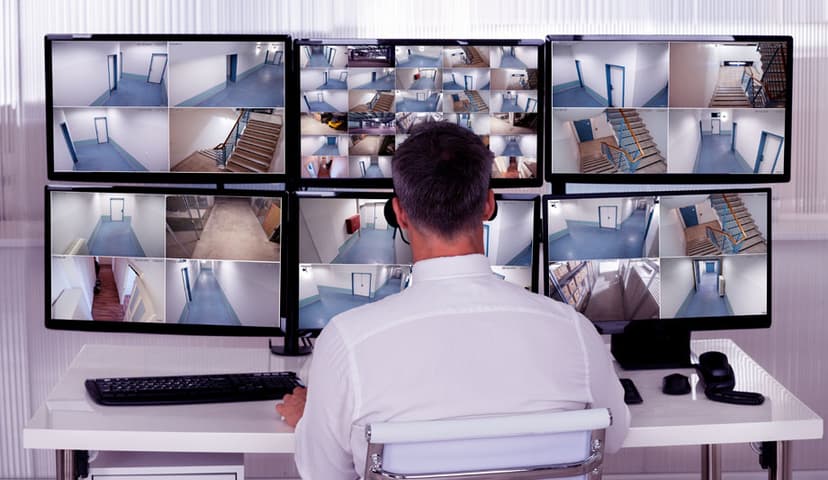
In today’s world, installing security cameras is a non-negotiable for homeowners and business owners in Austin. With rising concerns about break-ins and vandalism, a quality security camera system does more than just record footage. It offers peace of mind and real, measurable security camera benefits for homes and businesses. Modern systems bring advanced features like remote monitoring, instant motion alerts, and smooth smart-home integration. Moreover, they act as a visible warning that stops any kind of criminal before they can commit a crime. Whether you own a cozy family home in South Austin or manage a busy storefront downtown, understanding the advantages of installing security cameras helps you choose the right setup. Additionally, professional security camera installers make sure that your cameras cover every blind spot, cables stay protected, and your system runs without any issues. By investing in a well-designed surveillance solution, you enhance safety, lower your insurance premiums, and boost your security camera ROI. Read on to explore the top benefits you’ll enjoy, plus tips on maximizing performance and reliability. 1. Deter Criminal Activity How Visible Cameras Discourage Crime One of the most powerful surveillance camera benefits is their ability to reduce crime with surveillance naturally. When potential intruders spot cameras mounted on walls or poles, they often leave the idea of trespassing or vandalism. In fact, studies consistently show that properties with visible cameras experience fewer break-ins, thefts, and acts of vandalism. Moreover, criminals prefer low-risk targets. A single, well-placed camera can cover entry points such as doors, garage exits, and windows. Therefore, the presence of cameras turns your property into a high-risk environment for intruders. Plus, combining cameras with clear signage—“This property is under video surveillance”—also gives that message. Consequently, you enjoy much better security and safety without lifting a finger once the system is installed. 2. 24/7 Monitoring & Remote Access Always-On Surveillance at Your Fingertips Another major home security advantage is the ability to access live footage anytime, anywhere. Thanks to modern apps and cloud services, you can check your security camera system on your smartphone or computer, whether you’re at work, on vacation, or just in the next room. These systems send instant push notifications when motion is detected, so you never miss an important event. Plus, remote monitoring supports multiple users: homeowners can keep an eye on children returning from school, while managers can supervise staff during off-hours. With features like two-way audio and built-in sirens, you can even interact in real time, stopping trespassers or greeting visitors. In addition, stored clips on the cloud or a local network video recorder (NVR) ensure you have a searchable history. Thus, 24/7 monitoring delivers unmatched convenience, helping you stay connected and in control around the clock. 3. Better Safety for Families & Employees Protecting Loved Ones and Team Members Safety is more than about stopping crime; it’s about caring for people. With improved safety and security cameras, you can watch over children, elderly relatives, or pets while attending to daily tasks. For example, you’ll know the moment your teenager arrives home or if a caregiver is sticking to the schedule. In a workplace setting, business security with cameras helps enforce safety protocols and discourages internal theft. You can verify that employees follow safety guidelines, such as wearing protective gear in manufacturing environments or sanitizing surfaces in retail stores. When everyone knows cameras are active, they tend to act more responsibly. As a result, incidents decrease and overall productivity improves. Combining better safety with clear video evidence also speeds up incident investigations, protecting both your people and your property. 4. Easy Evidence Collection for Police & Insurance The Power of Video Evidence One of the best security camera benefits is their role in evidence collection for police and insurance. If a crime occurs on your property, having high-quality video footage greatly helps in identifying criminals and getting proof. In the event of a break-in or vandalism, cameras provide irrefutable documentation that can help law enforcement track down suspects. High-definition video captures every detail, from facial features to vehicle license plates, giving authorities valuable information to speed up investigations. For insurance purposes, having video evidence is equally important. It speeds up claims processing, allowing insurance companies to assess damage and theft quickly. With clear footage of the incident, you are more likely to receive a fair payout and may even help law enforcement recover stolen property. The more detailed your footage, the better the chances of a successful resolution to a claim. Whether it’s for police investigations or insurance claims, the security camera's impact on property safety is undeniable, providing both preventive benefits and post-incident support. 5. Lower Homeowners and Business Insurance Costs Save Money with a Security Camera System Many people don’t realize that installing a security camera system can actually lower homeowners' and business insurance costs. Insurance providers understand that properties with cameras are less likely to experience loss, theft, or damage. As a result, they offer discounts to policyholders who install these protective measures. A professionally installed system that includes both cameras and alarms is even more likely to reduce premiums. This is especially beneficial for businesses, as the higher the risk, the higher the insurance premiums. With business security with cameras, you reduce that risk and gain the financial advantage of lower insurance rates. The savings can be your egg nest for something important over time, making the upfront installation cost worthwhile. For homeowners, a small decrease in your monthly premium can match the price of the camera system, meaning you’re securing your home and your wallet. 6. Remote Business Management Keep an Eye on Your Business from Anywhere Another major business security advantage is the ability to remotely manage your business operations. With modern security systems, you can monitor multiple locations from one device, making it easy to stay connected with your business no matter where you are. For example, you can track deliveries to see if they arrive on time, check in on customer interactions, or monitor employee productivity
WINDOWS SERVER 2022 PREVIEW HAS BEEN RELEASED

Get ready folks, Microsoft has released their latest server OS preview called Microsoft Server 2022. New features includes new capabilities such as advanced multi-layered security, more hybrid capabilities with Azure Arc, and storage migrations
Fiber Optic Flavors

Fiber Optic cables comes in so many flavors and options. You can have OM1, OM2, OM3, OM4, OS1, OS2, etc. On top of that, you can have indoor or outdoor, plenum, riser, pvc, etc. If you are looking to get some fiber cables install, terminate, or repair, give us a call. Let us take the headache away from this daunting task of deciding what’s best for you business, so you can focus on taking care of your own business.
How Business Communication Solutions Enhances Your Projects with Cost-Effective Subcontracting

At Business Communication Solutions (BCS), we understand the importance of efficiency, reliability, and cost-effectiveness in the ever-evolving world of technology and infrastructure projects. One of the core services we offer is subcontracting for primary contractors. This strategic collaboration allows us to deliver top-notch managed IT services at competitive rates, enabling primary contractors to maintain profitability while offering high-quality solutions to their clients. The BCS Advantage Our expertise spans a wide range of services, including: Voice Cabling: Ensuring clear and reliable communication systems. Data Cabling: Establishing robust data networks to support various business needs. Coaxial Cabling: Providing high-quality connections for audio and video transmissions. Fiber Optic Cabling: Implementing high-speed, high-capacity connections for modern infrastructure. Security Camera Cabling: Setting up comprehensive surveillance systems for enhanced security. Access Control Cabling: Installing secure and efficient access control systems. Networking Services: Designing and managing both wired and wireless networks for optimal performance. We bring this comprehensive skill set to every subcontracting project, ensuring that primary contractors can rely on us to handle complex and varied tasks with precision and professionalism. Competitive Pricing without Compromising Quality: One of the key benefits of partnering with BCS as a subcontractor is our ability to provide high-quality services at lower costs. By leveraging our extensive industry experience, efficient processes, and strategic partnerships with suppliers, we can offer competitive pricing that helps primary contractors stay within budget. This cost-saving advantage does not come at the expense of quality; our commitment to excellence ensures that every project we undertake meets the highest standards. Comprehensive Services for Diverse Needs Whether your project involves setting up a robust wired and wireless network, installing advanced security camera systems, or implementing state-of-the-art access control solutions, BCS has the expertise to get the job done. Our services are tailored to meet the specific needs of various industries, including finance, mass media, entertainment, education, insurance, real estate, and more. This versatility makes us an ideal partner for primary contractors working on diverse projects across different sectors. Seamless Integration and Collaboration At BCS, we prioritize seamless integration and collaboration with our primary contractor partners. We understand the importance of maintaining clear communication, adhering to project timelines, and ensuring that all work is completed to the highest standards. Our team works closely with primary contractors to understand project requirements, develop tailored solutions, and execute tasks efficiently. This collaborative approach ensures that projects run smoothly, deadlines are met, and clients are satisfied with the final results. Enhancing Your Profitability. By choosing BCS as your subcontractor, primary contractors can enhance their profitability in several ways: Cost Savings: Our competitive pricing allows primary contractors to reduce project costs, increasing their profit margins without sacrificing quality. Expertise and Efficiency: Our skilled team brings a wealth of knowledge and experience to every project, ensuring that tasks are completed quickly and accurately, minimizing delays and rework. Reliability and Trust: With BCS as your subcontracting partner, you can trust that we will deliver on our promises, allowing you to focus on other critical aspects of your projects. Partner with BCS Today At Business Communication Solutions, we are dedicated to helping primary contractors succeed by providing cost-effective, high-quality subcontracting services. Our commitment to excellence, competitive pricing, and comprehensive service offerings make us the ideal partner for your next project. Contact us today to learn more about how we can collaborate to achieve your project goals and enhance your profitability. Together, we can build a future of successful and efficient projects that benefit everyone involved. 512.257.1433
5 Crucial Features Your Business Security Camera System Must Have
Why Most Business Security Systems Fail (And How To Fix Yours) Many business owners invest in security cameras expecting an ironclad safeguard, only to realize later that their setup is little more than expensive office décor. Blurry footage, spotty recording, and equipment succumbing to rain or Texas heat leave wide gaps in protection. We’ve audited hundreds of commercial security camera installations and identified the five non-negotiable features that separate a truly effective surveillance network from one that simply looks good on paper. So, let’s start. 1. 4K Resolution with Digital Zoom: The Difference Between “Maybe” and “Positive ID” The Resolution Shortfall in 1080p Cameras Standard high-definition cameras, 1080p models, once represented the pinnacle of commercial surveillance. However, in today’s environment, they often leave you with grainy, unusable footage. Here’s what typically goes wrong: Faces as Blurred Blobs: When a person’s face appears as a small cluster of pixels, identifying suspects becomes guesswork rather than fact. Unreadable License Plates: A 1080p camera may capture a vehicle, but the plate number often remains too fuzzy to read beyond 10–15 feet. Loss of Critical Details: Small but pivotal cues like tattoos, jewelry, or distinctive clothing logos can vanish in low resolution, hampering investigations and insurance claims. For business owners, this lack of detail can turn security systems into liabilities. Imagine reviewing footage after an incident, only to find that all you can see is a moving silhouette. Not only does this fail to deter criminals, but it also prevents law enforcement from acting quickly and accurately. Why 4K (8MP) Is the New Standard To overcome these limitations, we recommend a minimum resolution of 4K, also known as 8 megapixels. Four times the pixel count of 1080p, 4K cameras deliver unparalleled clarity, ensuring you capture every nuance: Crisp Facial Recognition: Even at 20–30 feet, you will see enough detail to positively identify individuals by facial features, tattoos, or unique clothing. License Plate Clarity: A dedicated 4K license-plate camera can read plates at distances up to 50 feet, making it ideal for parking lots, loading docks, and alley entrances. Catch Subtle Clues: Logos, serial numbers on equipment, and other fine details remain visible even when zoomed in, strengthening investigations and insurance claims. The Power of Optical and Digital Zoom Resolution alone isn’t enough. Combine 4K sensors with optical zoom, which uses the camera’s lens mechanism to magnify the image without losing quality, and digital zoom, which enlarges the image electronically. Here’s how they work together: Optical Zoom for Distance: When you need to follow a moving subject across a lot or zoom in on a doorway several dozen feet away, optical zoom maintains full image integrity. Digital Zoom for Fine-Tuning: After locking onto a subject with optical zoom, digital zoom lets you crop in further while still retaining enough pixels for identification. In practice, you might set your camera to 5x optical zoom and then apply 2x digital zoom to focus on a face or license plate. Wide Dynamic Range (WDR) for Balanced Lighting Even 4K cameras struggle in scenes with extreme contrasts, like a bright doorway leading into a dark lobby. Wide Dynamic Range (WDR) solves this by balancing light and dark areas in real time: Highlight Preservation: WDR captures detail in bright areas (windows, illuminated signs) without overexposing them. Shadow Detail: Simultaneously, it brightens dark zones so you don’t lose information in shaded corners. With WDR, a single 4K camera installed in a storefront can provide clear, usable footage whether it’s midday sun streaming in or dim evening light seeping through windows. 2. 24/7 Recording with Backup Because Crime Doesn’t Take Breaks The Problems of Motion-Activated and On-Site-Only Recording Some business owners try to save costs by relying solely on motion-activated recording or by keeping footage only on local DVRs. Unfortunately, these shortcuts create significant vulnerabilities: Missed Pre-Event Context: Motion sensors only start recording when movement is detected, but you need the full picture from moments before the event, to well after, to understand motives and timelines. Vulnerable On-Site Storage: Local DVRs or NVRs (Network Video Recorders) can be stolen, vandalized, or destroyed in a fire, taking all your evidence with them. Insufficient Retention Periods: Systems configured to auto-delete after 24–48 hours leave no cushion for reviewing older incidents, particularly if you’re only performing occasional checks. In practice, these gaps mean you might miss the first appearance of a suspect at your property or lose footage just when you need it most: during a break-in that coincides with a power outage, for example. Implementing True 24/7 Recording To avoid these issues, your system must record continuously, day and night, without interruption: Continuous Local Recording: A professional network setup ensures cameras feed data to on-site recorders around the clock, capturing every frame. Uninterruptible Power Supplies (UPS): For critical cameras and NVRs, install a UPS or backup generator so that power failures, which are common during storms, don’t create gaps in your footage. Scheduled Redundancies: Configure your system to overwrite the oldest footage only after a retention threshold (e.g., 30 days), guaranteeing you always have a substantial video history. Cloud Backup: Off-Site Peace of Mind Even the most robust on-site setup is vulnerable if an intruder disables or steals your recorder. Cloud backup provides an off-site insurance policy: Automatic, Encrypted Uploads: Footage is uploaded in real time to secure data centers, where it is stored under encryption and protected from tampering. Remote Accessibility: Whether you’re in the office, at home, or halfway around the world, you can review archived footage via a secure web portal or mobile app. Scalability: Cloud plans typically allow you to adjust your storage capacity and retention period as your needs change. Local Network Video Recorder (NVR): Speed and Control While cloud backup is invaluable, on-site NVRs remain essential for immediate access: High-Capacity Storage: NVRs equipped with multi-terabyte drives can hold 30 to 90 days of continuous 4K footage, depending on camera count and compression settings. Fast Retrieval: Local playback is nearly instantaneous, allowing security teams to review critical incidents
Network Security – when is it sufficient?
I had a customer asked me when is network security sufficient? That’s a tough and broad question, I thought. I really didn’t have a direct easy answer to this. It really depends on what kind of business you are in, what kind of information you are trying to protect. Depending on the business, I’m pretty sure there are legal that you need to take into considerations, such as medical offices, health care, and hospitals needs to be hippa compliant. With that being said, I have a minimum that I like to set in place for most offices, then when we are done, we realize there needed to be more security. For most office, I would recommend a minimum of antivirus software on each pc/devices/server, etc. I also think most office will need some kind of firewall/router in place with some kind of way to manage threat from outside. Then of course, blocks as many ports as possible from outside and make sure everyone have super strong password with some kind of system in place to make sure password security is enforce. I also highly recommend locking up server room/network closets, etc. That would be my minimum recommendation. If you can afford to do more, then you should do more.
PHONE SERVICE IN CALIFORNIA

Phone Service in California: Phone service in California includes both landline and mobile options, offering reliable communication across the state. Providers offer various plans for residential and business use, featuring local, long-distance, and internet services. With a large population and advanced infrastructure, California boasts widespread mobile coverage, VoIP services, and modern fiber-optic connections, ensuring access to high-quality communication in both urban and rural areas. Getting highly recommended by one great company to another is something we are very proud of. With that respect, we get to experience working in California. We installed new phone system for a company that requires communication and networking not only nationwide, but also international. Having a very reliable equipment and connections are very important to this company. They wanted to update their telephone software to a more advance and sustainable system. That’s when our company, Business Communication Service was highly recommended to them. By installing our very own Allworx Business Telephone System we helped them increased their productivity. We end up terminating two T1 for voice in this phone system. One T1 is for direct local call nationwide and the other is direct call to China and vice versa. The purpose for this is to cut back international cost. We also replaced one hundred and more of their phones to Allworx business telephones. Instinctive options was appreciated by the employees because of the feature of the new phones was easy to navigate. In technology nowadays updating is a very good sign of improvement especially in business.
Understanding DHCP and DNS: Essential Components of Modern Networks
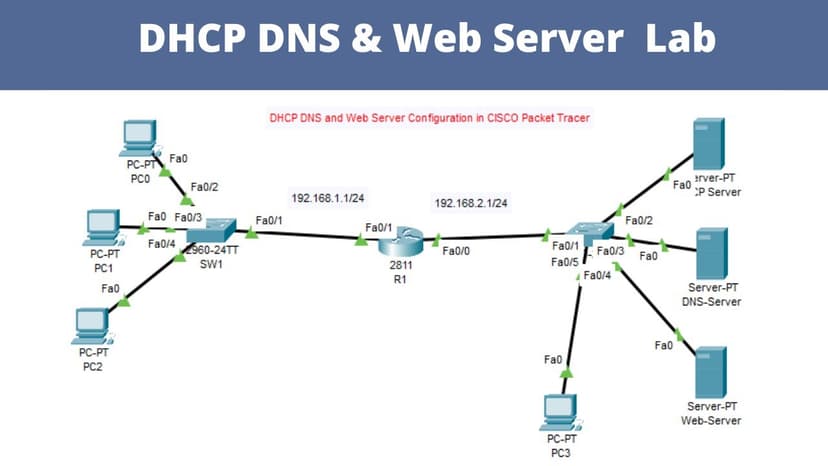
In the ever-evolving landscape of IT infrastructure, two fundamental technologies play pivotal roles in ensuring seamless network operations: Dynamic Host Configuration Protocol (DHCP) and Domain Name System (DNS). Both are critical for maintaining efficient and reliable network services, whether for small businesses or large enterprises. As a managed server provider, we aim to demystify these technologies and highlight their importance. What is DHCP? DHCP, or Dynamic Host Configuration Protocol, is a network management protocol used to automate the process of configuring devices on IP networks. Essentially, it assigns IP addresses and other network configuration parameters dynamically to each device on a network, allowing them to communicate effectively. Key Functions of DHCP: IP Address Allocation: DHCP automatically assigns IP addresses to devices (clients) from a predefined range (scope) on a network. Configuration Information: It provides clients with essential network configuration parameters such as subnet masks, default gateways, and DNS server addresses. Address Management: DHCP can reclaim and reassign IP addresses, ensuring efficient use of IP address space. Benefits of DHCP: Simplifies Network Management: By automating IP address assignment, DHCP reduces the complexity and administrative overhead of managing IP addresses manually. Reduces Configuration Errors: Automation minimizes the risk of human error associated with manual IP address configuration. Scalability: DHCP is scalable, making it suitable for networks of all sizes, from small offices to large enterprises. What is DNS? DNS, or Domain Name System, is a hierarchical and decentralized naming system that translates human-friendly domain names (like www.example.com) into IP addresses (like 192.0.2.1) that computers use to identify each other on the network. Key Functions of DNS: Hostname Resolution: DNS translates domain names to IP addresses, enabling users to access websites using easy-to-remember names instead of numeric IP addresses. Email Routing: DNS is used in email systems to route messages to the correct mail servers using Mail Exchange (MX) records. Service Discovery: DNS helps in locating services within a network using Service (SRV) records. Benefits of DNS: Ease of Use: Simplifies access to websites and services by allowing users to use memorable domain names instead of IP addresses. Scalability: DNS is designed to handle the vast number of domain names and IP addresses on the internet. Load Balancing: DNS can distribute network traffic across multiple servers to improve performance and redundancy. The Interplay between DHCP and DNS In a well-managed network, DHCP and DNS work in tandem to provide seamless connectivity and resource access. Here’s how they interact: Dynamic Updates: DHCP can be configured to update DNS records dynamically. When a device is assigned a new IP address by DHCP, it can automatically update the DNS server with its new address. Streamlined Management: This dynamic update capability ensures that DNS records remain current, reducing the need for manual updates and minimizing the risk of stale records. Improved Network Efficiency: The combination of DHCP and DNS streamlines the process of connecting to network resources, as devices can be located and accessed using consistent and up-to-date information. Conclusion DHCP and DNS are integral components of modern network infrastructure. DHCP simplifies the process of IP address management, while DNS ensures that users can easily access resources using human-friendly domain names. Together, they enhance network efficiency, reduce administrative overhead, and improve the overall user experience. As a managed server provider, we understand the critical roles these technologies play. Our services include robust DHCP and DNS management to ensure your network operates smoothly and efficiently. Whether you’re a small business or a large enterprise, we have the expertise to optimize your network infrastructure for performance and reliability. Contact us today to learn more about how we can support your network needs. 512.257.1433
Outdoor Security Camera Installation: Your Ultimate Protection Guide
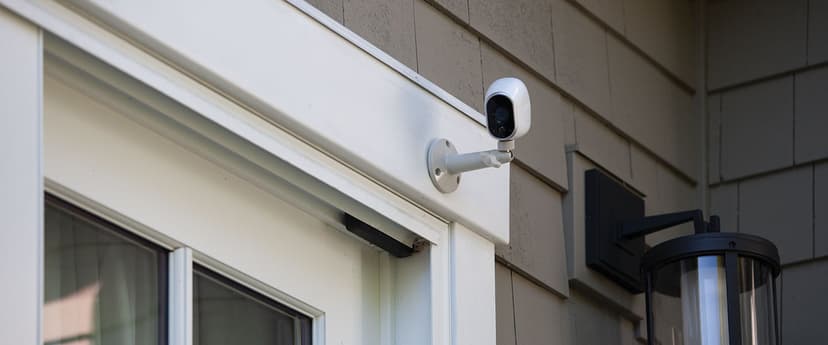
Rain, shine, or the dark of night, your property deserves vigilant eyes keeping watch around the clock. At Business Communication Solutions, we’ve installed thousands of outdoor camera systems across Austin’s diverse neighborhoods, from the historic bungalows of Clarksville to the sprawling estates of Westlake, and we know what it takes to build a setup that thrives in Texas heat, monsoon rains, and chilly winter nights alike. In this guide, we’ll walk you through everything you need to know to transform your exterior spaces into a secure perimeter, including the camera types that give burglars pause, the weatherproofing secrets that ensure reliability year-round, and the most common installation misstep you can avoid. Whether you’re a homeowner wanting to safeguard family and pets, a retail manager protecting your stock, or a facility director responsible for large perimeters, effective outdoor surveillance begins with smart planning and professional execution. Grab your coffee, settle in, and let’s explore how the right cameras, placements, and maintenance strategies will keep your property and your peace of mind secure. 1. Why Outdoor Cameras Are Non-Negotiable When it comes to protecting your home or business, indoor cameras are only half the battle. Modern outdoor cameras do far more than record static video. They actively deter wrongdoing, capture crucial details in shifting light, and integrate with other security measures, creating a proactive defense rather than a passive recording device. Here’s what today’s outdoor models can offer: Smart Motion Tracking Instead of triggering on every passing leaf or gust of wind, advanced cameras use analytics to follow genuine threats. When someone crosses your driveway or lingers near a side gate, the lens will pan, tilt, and zoom to keep that individual in frame, giving you uninterrupted video of their path and actions. Two-Way Talk Imagine seeing someone rifling through packages on your porch and being able to shout, “Stop right there!” through the camera’s built-in speaker. Two-way audio not only startles intruders but also lets you communicate with delivery drivers or visitors without opening your door. Extreme Weather Resistance Forget bulky, frost-smeared housings that fog up in winter. Premium outdoor cameras today are rated to operate from negative 40 degrees Fahrenheit up to 140 degrees Fahrenheit. Their sealed casings keep out rain, windblown dust, and curious critters, delivering reliable performance no matter the season. Investing in professionally installed outdoor cameras is more than adding another gadget to your property; it’s about creating a visible fortress that sends a clear message: your premises are not an easy target. Properly positioned cameras not only reduce the likelihood of break-ins but also provide crystal-clear evidence when you need it most, boosting conviction rates by 90 percent and speeding up insurance claims with indisputable footage. 2. Camera Placement: The Thief’s Worst Nightmare Even the best cameras can’t protect you if they’re pointed at blank walls or stuck too high out of reach. Strategic placement transforms your surveillance network into a seamless web of coverage, where every footstep is caught, every vehicle is logged, and every vulnerable point is locked down. Below, we’ve turned typical camera zones into clear subheadings, each one a critical piece of the security puzzle. Front Door: Doorbell Camera with Wide-Angle View Your front entrance is the most trafficked entry point and a prime target for porch pirates or late-night prowlers. A video doorbell camera mounted beside your main door should offer at least a 180-degree field of view to capture visitors who approach from either side. High-definition audio lets you hear knocks, chatter, or the crunch of footsteps on gravel, while the wide lens ensures you see every face clearly. Position this camera at eye level, around five feet off the ground so it records facial features without distortion. Driveway: License-Plate Recognition Camera Vehicles entering and leaving your property often hold the key to solving crimes. A license-plate recognition (LPR) camera positioned above your driveway entrance captures crisp, legible plate numbers, even in low light or at high speeds. These cameras pair powerful sensors with specialized software to automatically extract and log plate numbers in real-time, giving you a searchable database of every car that visits. Aim for around seven feet of height, tilted down at a gentle angle to minimize glare and maximize readability. Backyard: PTZ Camera with Auto-Tracking Large rear yards, workshop areas, and gardens demand a camera that can sweep across expansive spaces without leaving blind spots. Pan-tilt-zoom (PTZ) cameras excel here: they can be programmed to patrol preset routes or manually controlled to focus on areas of interest. When motion is detected, a PTZ unit locks on, zooms in, and follows the subject until it leaves the frame. Choose vandal-proof housing to protect the unit from curious hands or stray baseballs, and install it high on your home’s back wall or a sturdy pole for optimal reach. Side Gates: Bullet Camera with Motion-Activated Spotlight Side gates and alleyways are common sneaking-in routes because they’re less visible from the street. A bullet camera housed in a tough, weather-resistant shell pairs well with an integrated motion-activated spotlight. When someone approaches, they trigger the light and simultaneously activate recording, flushing out hiding spots and ensuring clear footage. Mount it about eight feet high, angled to cover both the gate latch and the path leading to it. Pool Area: 360-Degree Camera with Tamper Detection Swimming pools, patios, and play areas must balance safety and privacy. A 360-degree panoramic camera mounted on a central pole or overhang provides a single, seamless view of the entire zone. Ideal for keeping an eye on family members or detecting anyone who shouldn’t be there. Look for models with tamper-detection alerts, which notify you if someone tries to obscure the lens or spray paint over the housing. Since this area is exposed to splashes and humidity, choose cameras with at least an IP67 waterproof rating. Height and Angle Matter A general rule of thumb is to position outdoor cameras between seven and nine feet off the ground. Too low, and they’re vulnerable to tampering or
Disk Clean Up Tools

Disk Cleanup is a built-in tool in Windows that helps users free up space on their hard drive by removing unnecessary files. These files may include temporary files, system files, cached web pages, and other items that are no longer needed. The tool scans the system for such files and allows users to safely delete them, improving system performance and creating more available storage space. It's a simple way to maintain the efficiency of your computer without needing specialized software. Do you have a server or pc that is not working due to disk storage full or almost full? If you are an IT administrator or even a desktop support, you probably have ran into these issues. Sometimes, it’s legit that a person hard drive is full do to legit space usage, but more often, there are other issues, such as log file, temp files, windows updates, or backup logs files taking up space. When you run into these issues, what do you do? Do you try to manually figure out what is using up all the space or do you use a 3rd party software? I run into these issues a lot. For me I use a 3rd party software call spacemongo. It saves me lots of time, when I have a disk clean up job to do. If you are a business in Austin and have a need for a managed IT services company, give BCS a call. Let us help you save time, so you can focus on what you do best – Run your business.