

When customers ask, “How much internet speed do I need?” what they’re really asking is:
How many users can my network handle without slowing down?
The answer depends on bandwidth, Wi-Fi design, user behavior, and subnetting—not just the size of the internet circuit.
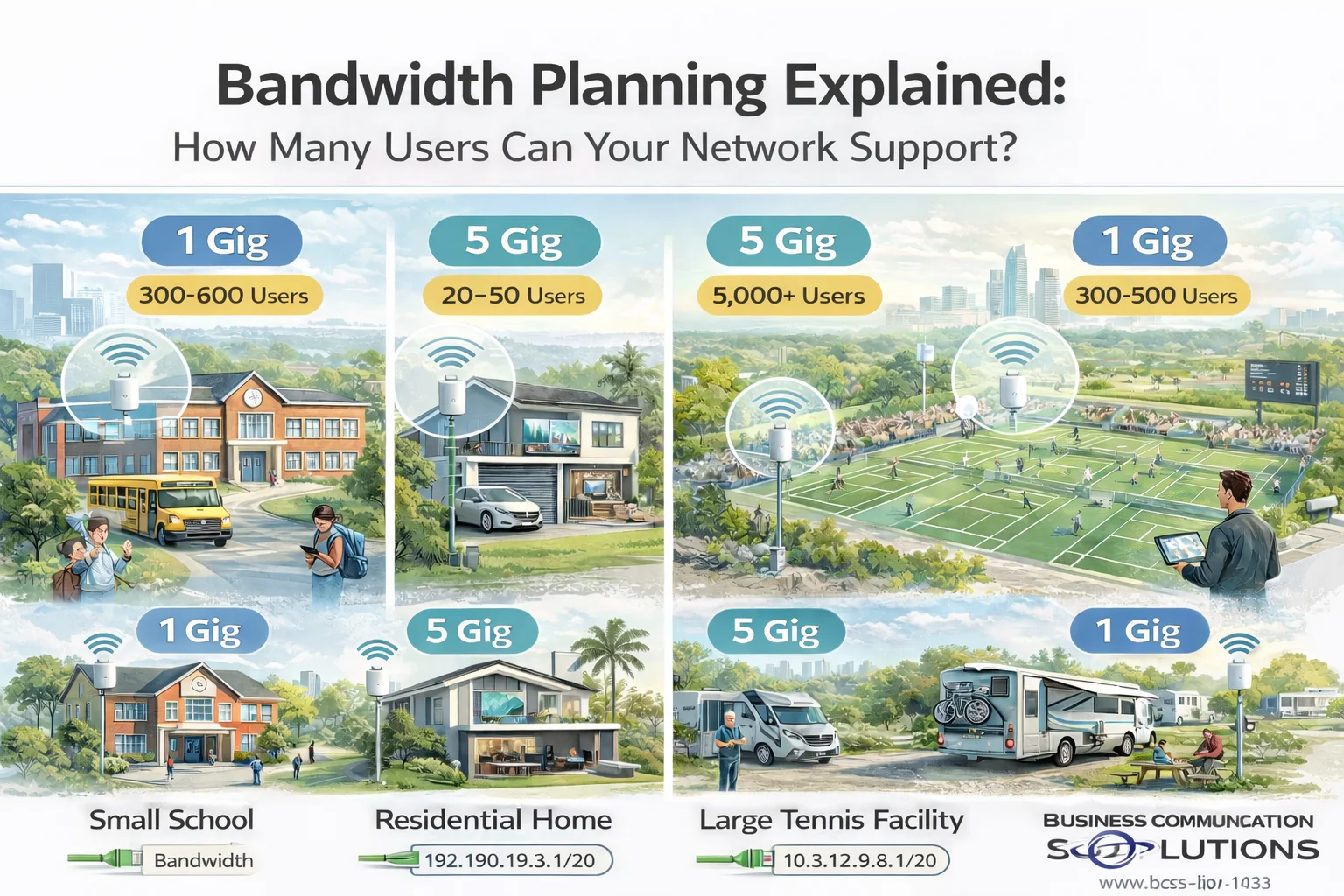
At Business Communication Solutions, we design and install networks across the Austin area for schools, homes, sports facilities, and RV parks. Below, we explain how bandwidth really works, using real-world projects we’ve recently completed.
Bandwidth vs Number of Users (The Biggest Myth)
Internet speed (1 Gig, 5 Gig, etc.) is a shared resource.
That means:
1 Gig does not mean every device gets 1 Gig
Most users are idle most of the time
A small percentage of users create most of the traffic
What actually determines performance:
Number of active users at the same time
What those users are doing (streaming, browsing, uploading)
Wi-Fi access point density and placement
Switching and backhaul capacity
IP address and subnet design
A well-designed network can support thousands of users on the same internet connection.
Real-World Network Projects (Austin Area)
🏫 Small School Network
Internet Speed: 1 Gig
Size: ~30 classrooms
School networks have:
Hundreds of devices
Bursty usage (testing, downloads, cloud apps)
Frequent device roaming
With proper access point placement, VLANs, and subnetting, a 1 Gig connection can easily support hundreds of students and staff.
Key design factors:
Multiple APs per hallway or classroom zone
Separate networks for students, staff, and administration
Proper subnet sizing to avoid IP exhaustion
🏡 High-Speed Residential Network
Internet Speed: 5 Gig
Homes behave differently than commercial spaces:
Fewer users
Very high per-device demand
Streaming, gaming, remote work, cloud backups
In residential environments, internal network design matters more than raw speed. Cabling, switches, and Wi-Fi must support multi-gig speeds or the internet connection is wasted.
🎾 Large Tennis Facility
Internet Speed: 5 Gig
Estimated Users: ~5,000
Outdoor venues are high-density but low-usage per user:
Most users browse, message, or check scores
Only a small percentage stream video
Users are constantly roaming
With proper Wi-Fi design and large subnets, a 5 Gig connection can support thousands of devices simultaneously.
Critical factors:
High-density outdoor access points
Load balancing across APs
Large subnets (such as /20)
Surge protection and centralized PoE power
🚐 RV Park Network
Internet Speed: 1 Gig
Size: ~70 RV slots
RV parks behave like small neighborhoods:
Long-term connected devices
Evening streaming peaks
High expectation for reliability
A 1 Gig circuit can support dozens of RVs when:
Wi-Fi coverage is evenly distributed
Bandwidth is fairly shared
Subnets support long-term device leases
Bandwidth Comparison Table
Environment
Internet Speed
Estimated Devices
Key Design Focus
Small School
1 Gig
300–600
VLANs, AP density, subnet sizing
Home
5 Gig
20–50
Multi-gig wiring, low latency
Tennis Facility
5 Gig
5,000+
High-density Wi-Fi, large subnets
RV Park
1 Gig
300–500
Fair usage, long-term IP leases
Why Subnetting Is Critical for Large Networks
Subnetting controls how many devices can receive an IP address.
If a subnet is too small:
Devices fail to connect
Wi-Fi looks “broken”
Users blame internet speed
If subnetting is done correctly:
Devices connect instantly
Roaming works smoothly
The network scales effortlessly
For large venues, we often use larger subnets (such as /20) combined with VLAN segmentation.
Big Subnet vs Small Subnet
Benefits of Larger Subnets
Supports thousands of devices
Seamless roaming across large areas
No IP shortages during peak events
Risks if Not Designed Properly
Excess broadcast traffic
Harder troubleshooting
Requires proper VLAN separation
Subnet size should always match environment size and usage patterns, not guesswork.
Frequently Asked Questions
How many users can 1 Gig internet support?
A properly designed network can support hundreds of users on 1 Gig, depending on usage.
Is 5 Gig internet overkill?
Not for high-density venues or users with heavy upload/download needs.
Why do networks feel slow even with fast internet?
Most performance issues are caused by poor Wi-Fi design, small subnets, or overloaded access points—not bandwidth.
Does subnetting affect Wi-Fi speed?
Indirectly, yes. Poor subnet design can prevent devices from connecting or roaming properly.
Bandwidth Planning in Austin Starts with Design
More bandwidth doesn’t fix bad network design.
Better design often performs faster on less bandwidth.
At Business Communication Solutions, we design networks around:
Real user behavior
Peak demand scenarios
Proper subnetting
Scalable infrastructure
Need Help with Network Design or Bandwidth Planning in Austin?
If you’re planning a network for a school, home, sports facility, RV park, or large venue, we can help you size it correctly from day one.
Business Communication Solutions
📞 512-257-1433
🌐 www.bcs-ip.com
Serving Austin, Round Rock, Cedar Park, Pflugerville, Leander, Georgetown, Buda, Kyle, and surrounding areas.