

When Internet Troubleshooting Gets Complicated: Real-World Connectivity Challenges in Austin Homes & Businesses

At Business Communication Solutions, we often get called in after customers have already spent hours—or days—on the phone with their internet service provider. On paper, the service should work. In reality, modern internet issues can be far more complicated than most people expect. Here are some of the most common problems we see across Austin and surrounding areas—and why a one-size-fits-all internet connection rarely delivers reliable results. Inconsistent Internet Providers Make Troubleshooting Harder Many internet service providers oversubscribe their networks. That means multiple homes or businesses are sharing the same bandwidth, especially during peak hours. When the provider’s network is inconsistent: Speeds fluctuate throughout the day Video calls drop or lag Cloud apps feel slow for no obvious reason VoIP phone calls become choppy or unreliable From the customer’s side, everything looks fine. From a network standpoint, the connection is struggling upstream—and that’s not something you can fix by rebooting a modem. Shared Internet Connections Are Not Ideal for Reliability Shared internet is one of the biggest hidden issues we see. In apartment buildings, shopping centers, office parks, and even some neighborhoods: Bandwidth is shared among many users Heavy usage by others impacts your performance Troubleshooting becomes guesswork because the problem isn’t always inside your building This is especially problematic for businesses that rely on: VoIP phone systems Video conferencing Cloud-based POS systems Remote work setups Reliable communication depends on consistent bandwidth—not just advertised speed. Why Coaxial Internet Falls Short Compared to Fiber Coaxial (cable) internet is still common, but it has real limitations. Coaxial Internet: Shared medium More prone to congestion Slower upload speeds Performance drops during peak hours Fiber Internet: Dedicated or less-shared bandwidth Symmetrical upload and download speeds Lower latency Far more reliable for modern applications For VoIP phones, cloud services, and business-critical operations, fiber simply performs better. When customers complain about “random issues,” the root cause is often coaxial infrastructure doing its best—but hitting its limits. Big, Beautiful Homes… With Thick Walls That Kill Wi-Fi We also frequently work in large, high-end homes with: Stone, brick, or concrete walls Metal framing Multiple floors Long distances between rooms These materials look great—but they are brutal on Wi-Fi signals. In these cases: The internet connection itself may be fine Wi-Fi simply can’t reach where it’s needed Store-bought routers are not enough This is where professional Wi-Fi design, proper access point placement, and hardwired backhauls make a massive difference. Why Local Support Matters Large internet providers focus on getting you online—not optimizing how your network actually performs inside your home or business. At Business Communication Solutions, we: Diagnose ISP-related issues beyond “restart the modem” Identify shared bandwidth problems Recommend fiber-based solutions when available Design Wi-Fi systems that work with thick walls and large spaces Support VoIP phone systems that depend on stable internet Because we’re local, we can actually come on-site, see the environment, and fix the real problem—not just read from a script. Need Help With Internet or Network Issues in Austin? If your internet feels unreliable, slow, or inconsistent—and your provider keeps saying everything looks fine—it’s time for a second opinion. 📞 Call Business Communication Solutions at 512-257-1433 We serve Austin and surrounding areas and specialize in making internet and communication systems actually work in the real world.
UniFi Network Installed but No Controller? A Common Problem in Austin Homes & Businesses

At Business Communication Solutions, we visit many homes and businesses in Austin, Texas that have UniFi (Ubiquiti) networking equipment installed—but no active controller in place. The access points are mounted. The network “works.” But when the customer needs to change a Wi-Fi password or troubleshoot an issue, things get complicated fast. Why UniFi Controllers Often Go Missing In many installations, the original installer: Used a laptop-based UniFi Controller Adopted all the devices Completed the install Then took the laptop with them Once that happens: The controller no longer exists on-site The customer does not have admin access Network settings become difficult or impossible to change This is one of the most common UniFi support calls we receive in Austin. What Happens Without a UniFi Controller UniFi access points and switches will continue to pass traffic without a controller, but management is lost. Without an active controller: Wi-Fi passwords can’t be easily changed Firmware updates are difficult Network troubleshooting is limited New devices can’t be adopted Logs and alerts are unavailable For businesses, this becomes a real operational issue. For homes, it turns simple changes into major headaches. What Is a UniFi Network Controller? A UniFi Controller is the management platform that: Controls Wi-Fi networks Manages switches and gateways Handles user access and security Provides monitoring and alerts It can run on: A Cloud Key A UniFi Gateway A local server A properly maintained computer The key is that it must stay available. Pros of Using a Proper UniFi Controller When set up correctly, UniFi offers major advantages: Centralized network management Easy Wi-Fi password changes Remote troubleshooting Scalable for homes and businesses Enterprise-grade features at a reasonable cost Excellent visibility into network health This is why UniFi is so popular—but only when installed correctly. Cons (When Installed Incorrectly) Most UniFi complaints we hear are not about the hardware—they’re about how it was deployed. Common problems include: Controller installed on a technician’s laptop No admin credentials left behind No backups of the configuration No documentation In these cases, customers often believe their system is “locked” or broken—when it’s actually recoverable. How Business Communication Solutions Helps UniFi Users in Austin We specialize in: Recovering UniFi networks with missing controllers Migrating laptop-based controllers to permanent solutions Setting up Cloud Keys or gateway controllers Restoring admin access Securing and documenting networks Supporting both residential and business UniFi systems We work with existing installations—not just new builds. Home & Business UniFi Support in Austin Whether you have: UniFi access points at home A UniFi network in your office An installer who disappeared No way to manage your Wi-Fi 📞 Call Business Communication Solutions at 512-257-1433 We provide local UniFi and Ubiquiti support in Austin and surrounding areas for homes and businesses. UniFi Installed? But No Way to Manage It? You don’t need to replace your network. In most cases, we can: Restore control Improve performance Make your UniFi system easy to manage again Local help. Real solutions. No vendor lock-in.
Why Network Printers Keep Disconnecting (And How Static IPs Fix It)
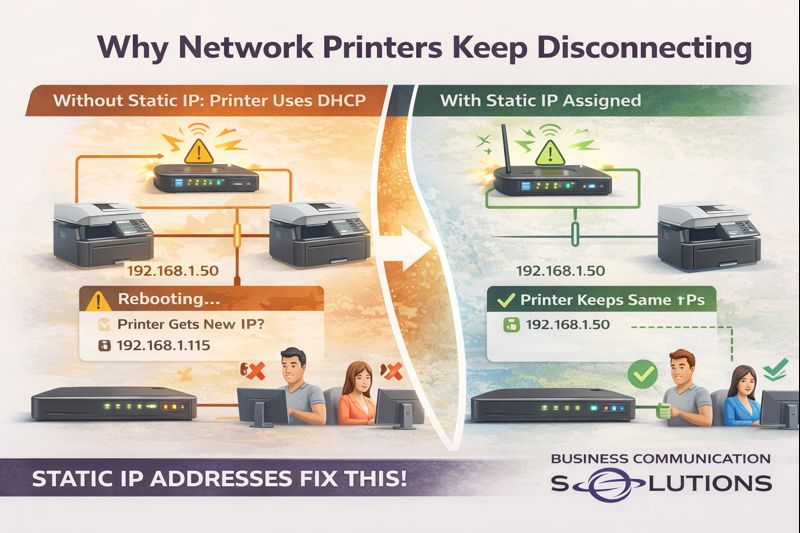
At Business Communication Solutions, we helped a customer in Austin, Texas today who was frustrated because their network printer kept disappearing. One day it worked perfectly, the next day no one could print—again. The cause wasn’t the printer hardware. It was the printer being set up with DHCP instead of a static IP address. This is one of the most common (and overlooked) issues with network printers. What Happens When Printers Use DHCP By default, most printers are configured to: Automatically receive an IP address from the router (DHCP) Accept any available address on the network That works fine—until the network: Reboots Loses power Receives an ISP modem/router update When that happens: The printer gets a new IP address Computers still try to print to the old IP Print jobs fail The printer shows “offline” even though it’s powered on From the user’s perspective, the printer just “randomly stopped working.” Why This Is Worse on Business & Shared Networks On regular business or home networks: Phones, laptops, tablets, TVs, and IoT devices are constantly joining and leaving IP addresses are reassigned dynamically Routers don’t care which device gets which IP Printers, however, need consistency. If a printer’s IP changes: Mapped printers break Accounting and POS systems lose access Scan-to-email and scan-to-folder stop working Users waste time reinstalling printers (over and over) Why Static IP Addresses Matter for Printers Assigning a static IP to a printer ensures: The printer always keeps the same network address Computers always know where to send print jobs Printing works after power outages No more “printer offline” errors after reboots In short: Static IPs eliminate printer instability. This is especially important for: Offices with multiple users Medical and legal offices Restaurants and retail POS printers Home offices with shared printers The Plug-and-Play Trap Plug-and-play printer installs are fine: On day one Before the first power outage Before the router reboots But once the network changes, DHCP-based printers often fail silently. That’s when customers call us—usually after reinstalling the printer three times. What We Fixed for Our Austin Customer For this customer, we: Identified the printer was using DHCP Assigned a proper static IP outside the DHCP range Updated all computers to point to the correct IP Verified printing after network reboot Prevented future disconnects Once configured correctly, the printer stayed online—even after testing power cycles. Why Local IT Support Makes the Difference Big vendors and printer manufacturers focus on installation—not reliability. At Business Communication Solutions, we: Troubleshoot printers others won’t touch Fix recurring “offline” printer issues Work with existing routers and networks Handle the small network problems that cause big productivity losses Because we’re local, we actually come on-site and fix the root cause. Printer Keeps Going Offline in Austin? We Can Help. If your printer: Randomly shows offline Stops working after power outages Needs to be reinstalled constantly 📞 Call Business Communication Solutions at 512-257-1433 We serve Austin and surrounding areas and specialize in stable, properly configured business and home networks.
Conduit Does NOT Waterproof Cable: A Common Underground Cabling Mistake in Austin, TX
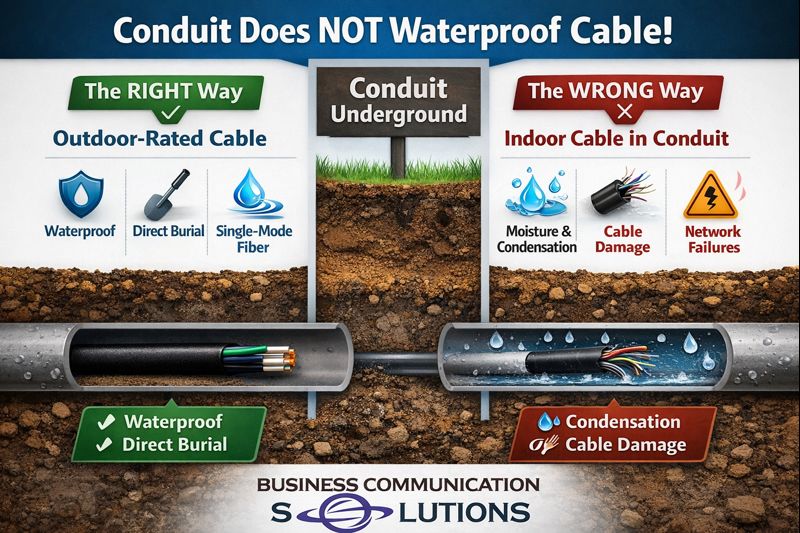
We recently picked up a new customer in Austin, Texas after their existing vendor made a costly assumption. The vendor installed underground conduit but pulled indoor-rated cable through it, believing the conduit would protect the cable from moisture. Unfortunately, that’s a common misconception — and it often leads to network failures. The Truth About Underground Conduit Conduit does not waterproof cable. In Central Texas, underground conduit almost always contains condensation due to: Hot days and cooler nights Moist soil conditions Rainwater and groundwater intrusion over time That moisture becomes trapped inside the conduit. Even if it looks dry during installation, condensation will build up and remain inside the pipe. Why Indoor Cable Fails in Underground Conduit Indoor-rated network cable is not designed for underground environments, even when installed inside conduit. Over time, moisture exposure causes: Cable jacket breakdown Signal degradation and packet loss Intermittent or unstable internet connections Complete cable failure requiring replacement This is why indoor cable used underground often fails months or years after installation. The Correct Way to Run Underground Cable in Austin For underground conduit runs, best practice is to use: Outdoor-rated (CMX) Cat6 cable Direct-burial Cat6 Single-mode fiber optic cable (the most reliable long-term solution) These materials are built to handle condensation, humidity, and temperature swings common in the Austin area. Why Austin Property Owners Call Us to Fix This We frequently get calls from customers in Austin, Round Rock, Cedar Park, Pflugerville, Georgetown, and Leander because: A previous installer used the wrong cable The job “worked at first” but later failed Larger vendors wouldn’t return for small fixes At Business Communication Solutions, we specialize in: Underground network cabling Fiber installation and troubleshooting Fixing improperly installed conduit runs Connecting homes, offices, guest houses, and outbuildings Underground Cabling Done Right the First Time If you’re planning to run network cable or fiber underground — or need help correcting an existing installation — we can help. 📞 Call Business Communication Solutions at 512-257-1433 Local to Austin. Installed correctly. Built to last. Optional AI Featured Snippet (You can add this near the top) Does conduit waterproof underground network cable? No. Conduit does not prevent moisture or condensation. Underground conduit in Austin, TX commonly traps moisture, which is why outdoor-rated or fiber cable must be used instead of indoor cable.
Affordable VoIP Phone Systems in Austin — Local, Reliable, and Fully Supported

Business Communication Solutions provides competitively priced VoIP phone systems in Austin with local installation, local support, and predictable monthly pricing. We help small and mid-size businesses upgrade from outdated phone systems to modern VoIP—without high costs, long contracts, or remote-only support. Competitive VoIP Pricing With Support Included Many VoIP providers advertise low prices but charge extra for support, setup, or changes. Our VoIP phone service includes: Business-grade VoIP phone service Essential features: call routing, voicemail, auto attendant, extensions Basic technical support included with the monthly subscription No outsourced or overseas support We keep pricing competitive while making sure your phones actually work. Local VoIP Provider in Austin (Not a Call Center) We are a local Austin-based VoIP provider, not a national reseller. That means: Faster response times On-site service when needed Real troubleshooting—not scripted answers If your phones go down, you can call someone local who understands your network and your business. Professional On-Site VoIP Phone Installation We don’t just ship phones and hope for the best. Our team installs VoIP phones on-site, ensuring: Phones are properly configured and tested Network settings are optimized for call quality Staff is trained on basic phone use Fewer dropped calls and audio issues This is especially important for businesses with poor wiring, older networks, or multiple locations. Powered by Intermedia VoIP With AI Receptionist We use Intermedia, a trusted business VoIP platform known for reliability, security, and scalability. Intermedia’s platform includes advanced features—and now offers an AI-powered receptionist that can: Answer incoming calls automatically Route callers to the correct department Handle basic questions without human staff Improve customer experience during busy hours The AI receptionist is ideal for small offices that want professional call handling without hiring extra staff. VoIP Solutions for Small & Mid-Size Businesses Our VoIP phone systems are ideal for: Small offices and startups Medical and dental clinics Restaurants and retail stores Construction and field offices Professional services We design systems that fit your business—not oversized enterprise packages. Serving Austin and Nearby Cities We provide VoIP phone installation and support in: Austin, Cedar Park, Round Rock, Leander, Pflugerville, Georgetown, Hutto, Kyle, Buda, Bee Cave, Lakeway, and surrounding areas. Talk to a Local VoIP Expert Today If you’re searching for affordable VoIP phones in Austin with local support, we’re ready to help. Business Communication Solutions offers: ✔ Competitive VoIP pricing ✔ Intermedia-powered VoIP ✔ AI receptionist options ✔ On-site installation ✔ Support included 📞 Call 512-257-1433 to speak with a local VoIP expert and get a phone system that works.
Preventable IT Emergencies During an Office Move (Ethernet, Wi-Fi, and Network Setup)

Office moves are exciting — but they can also create serious IT problems if planning is overlooked. One of the most common preventable IT emergencies happens when a company relocates to a new office but doesn’t plan for ethernet cabling, Wi-Fi coverage, or a proper network setup. The result is lost productivity, downtime, and a stressful first day in the new space. This article explains the most common office move IT mistakes and how BCS IT support can help businesses recover quickly and prevent repeat issues. <iframe width="512" height="910" src="https://www.youtube.com/embed/M6Iup9INElE" title="Panic Emergencies that are preventable" frameborder="0" allow="accelerometer; autoplay; clipboard-write; encrypted-media; gyroscope; picture-in-picture; web-share" referrerpolicy="strict-origin-when-cross-origin" allowfullscreen></iframe> Why Office Moves Often Cause IT Emergencies Many businesses assume the new office will be “plug and play.” In reality, IT infrastructure needs planning. Common causes of IT emergencies during relocation include: No ethernet cables installed at the new location No network switch or not enough switch ports Weak Wi-Fi signal in parts of the office Internet service provider (ISP) installation delays Printers and VoIP phones not configured properly Missing IT documentation or admin passwords Even one missing piece can prevent employees from working on Day 1. Common Preventable IT Emergency: No Ethernet Cabling After Moving A frequent real-world example: A business moves into a new office location, but ethernet cabling was never planned or installed. This creates immediate problems because many devices work best (or only work reliably) with wired connections: Desktop computers and docking stations Network printers VoIP phones Conference room equipment Network security devices Wi-Fi alone is rarely enough for a full office environment, especially for stable phone systems and printing. The Business Impact of IT Downtime During a Move When IT is not ready after relocation, businesses may experience: Lost employee productivity Missed customer calls (phone outages) Delayed operations and service delivery Security risks from temporary setups Emergency spending on rushed fixes Even a “small mistake” can quickly become a costly disruption. How BCS Helps With Office Move IT Support (Fast Recovery + Long-Term Fix) Even if a move-related IT emergency is caused by a missed planning step, the situation is recoverable. BCS supports businesses during office move emergencies by: Rapid troubleshooting and diagnosis BCS identifies the root issue quickly, such as: missing ethernet drops insufficient switch capacity poor Wi-Fi design ISP activation problems Quick stabilization and business continuity BCS helps restore operations with practical solutions: temporary networking setups fast Wi-Fi optimization equipment sourcing and configuration coordination with cabling contractors and ISPs Proper network design after the emergency Once business operations are restored, BCS helps implement a reliable long-term setup: structured cabling plan network switch sizing and installation secure router/firewall configuration Wi-Fi access point placement documentation for future support As a smaller IT company, BCS is able to respond quickly and provide hands-on support without long delays. Office Move IT Checklist (To Prevent Panic Emergencies) To avoid IT emergencies during an office move, businesses should confirm the following: Internet service provider (ISP) ISP availability at the new address Installation date confirmed before move-in Service activated and tested Ethernet cabling Ethernet drops installed at key work areas Cabling installed for printers and conference rooms Patch panel / wiring closet plan confirmed Network equipment Network switch has enough ports for all devices Router/firewall installed and configured UPS / power protection available Wi-Fi setup Access points installed for full coverage Wi-Fi tested in meeting rooms and corners Separate guest Wi-Fi if required Access and documentation Admin credentials available for: router/firewall Microsoft 365 / email domain/DNS provider ISP account Backup configurations before relocation Conclusion: Most IT Emergencies Are Preventable — and BCS Can Help Most office move IT emergencies are not caused by complex technology. They happen because key infrastructure details — like ethernet cabling and network setup — are easy to overlook during a relocation. BCS helps businesses: recover quickly from move-related IT emergencies minimize downtime set up a stable, secure office network for long-term success FAQ: Office Move IT Problems What is the most common IT issue during an office move? The most common issue is moving into a new office without ethernet cabling or a complete network setup, resulting in no connectivity for computers, printers, and phones. Can Wi-Fi replace ethernet in an office? Not usually. Wi-Fi is important, but ethernet is still needed for stable performance, VoIP phones, printers, and business-critical devices. When should IT planning start for an office move? Ideally 4–8 weeks before moving, especially to schedule ISP installation and plan ethernet cabling. Can BCS help if we already moved and IT is not working? Yes. BCS can provide emergency troubleshooting, restore operations quickly, and then implement a proper long-term setup. Call BCS today to schedule office move IT support. 512.257.1433
Professional Fiber Internet Installation When ISPs Won’t Run It Where You Need It
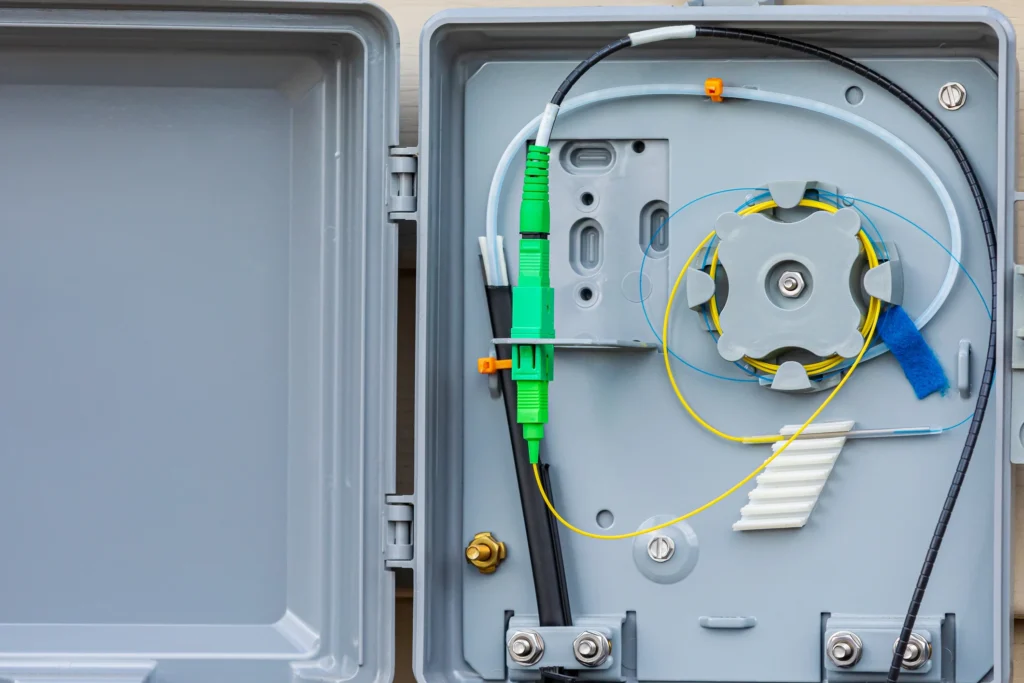
Getting fiber internet installed should mean fast, reliable service where you actually use it — but many Austin homeowners quickly learn that’s not how internet providers operate. Most fiber internet service providers in Austin will only install fiber: On the outside of the home In the closest or easiest location With minimal routing or wall fishing If you ask for fiber to be installed in a specific room, home office, or detached building, the answer is often: “We don’t do that.” That’s where Business Communication Solutions helps. The Fiber Installation Problem Many Austin Homeowners Face Internet providers like AT&T Fiber, Spectrum, Optimum, Astound, and others focus on speed and simplicity — not custom placement. Common issues we see: Fiber installed in garages or closets Poor Wi-Fi coverage throughout the home Router far from home office or media room Detached guest houses, studios, garages, or barns without internet ISP refusal to run fiber through attics, walls, or crawl spaces The service works — but the location doesn’t. Austin’s Local Experts for Custom Fiber Runs Business Communication Solutions specializes in custom residential fiber installation in Austin and surrounding areas. We don’t replace your internet provider — we extend and reroute the fiber after activation so it’s installed where it makes sense for your home. What We Do Run fiber to specific rooms or network panels Route fiber through attics, walls, and crawl spaces Install fiber for: Home offices Living rooms Network racks Smart home panels Extend internet to guest houses, back houses, garages, studios, barns, and workshops Deliver clean, professional, low-voltage installations Carrier-Agnostic Fiber Installation We work with all internet service providers, including: AT&T Fiber Spectrum Optimum Astound Google Fiber And more 👉 We don’t care who your carrier is. If the provider won’t run fiber where you want it, we will. Complex Fiber Installations ISPs Refuse to Do We regularly handle: Long attic fiber runs Multi-story homes Detached structures Underground conduit between buildings Proper fiber termination and cable management If your ISP says it’s “not possible” or “not supported,” it usually just means they don’t want to do it. Ideal for Homes & Properties With Multiple Buildings This service is perfect if you: Work from home in Austin Need reliable internet in a detached office or guest house Want better performance than Wi-Fi extenders or mesh systems Own a property with multiple structures needing internet Serving Austin & Surrounding Cities We provide custom fiber installation services throughout: Austin, Round Rock, Cedar Park, Pflugerville, Leander, Georgetown, Kyle, Buda, Lakeway, Bee Cave, Manor, Hutto, Taylor, Bastrop, and nearby areas. Get Fiber Internet Installed Where You Actually Need It Stop fighting with your internet provider. 📞 Business Communication Solutions 📱 Call or Text: 512-257-1433 Local. Professional. Done right the first time.
Fiber Splicing & Troubleshooting in Austin — Even When the Job Is “Too Small”

At Business Communication Solutions, we regularly help businesses and property owners in Austin, TX and surrounding areas with fiber splicing, fiber repairs, and fiber troubleshooting. Many of these calls start the same way: “Our internet keeps dropping, but our provider won’t come out.” “The fiber is there, but nobody wants to troubleshoot it.” “They said the job is too small.” That’s exactly where we come in. Fiber Problems Don’t Have to Be Big to Be Critical You don’t need a massive data center to have fiber issues that matter. A single bad splice, damaged connector, or improperly terminated strand can: Cause intermittent outages Reduce speeds Create packet loss or unstable connections Take down an entire office, building, or remote structure Unfortunately, many large vendors and carriers focus only on new installs and large projects, leaving smaller but important issues unresolved. Our Fiber Splicing & Troubleshooting Services We provide hands-on fiber support for both business and commercial customers in the Austin area, including: Fiber optic splicing (single-mode & multi-mode) Fiber repair and cleanup Troubleshooting intermittent fiber issues Testing and verification of existing fiber runs Fixing poor or failed splices from previous installs Helping customers diagnose issues when the original vendor will not If the fiber already exists but isn’t working reliably, we can usually find the problem. Helping Where Other Vendors Won’t We’re a smaller, local company, and that’s a good thing. Because we’re not a large national contractor: We take on smaller fiber jobs We pay attention to details others overlook We don’t rush through troubleshooting We work with what’s already installed We often get called in to fix issues that larger vendors don’t want to touch because: The job is “too small” It’s a troubleshooting request, not a new install It involves someone else’s work Our focus is simple: get it working correctly. Fiber Troubleshooting for Real-World Setups We commonly help with fiber issues in: Offices and small businesses Warehouses and light industrial buildings Multi-tenant buildings Back buildings, IDFs, and MDFs Existing fiber runs between buildings If your fiber was installed years ago, recently installed but never quite right, or patched together over time — we can help clean it up and stabilize it. Local Fiber Support in Austin & Surrounding Areas We proudly provide fiber splicing and fiber troubleshooting in Austin and nearby cities, including: Cedar Park, Round Rock, Pflugerville, Leander, Georgetown, Bee Cave, Lakeway, and surrounding areas. Call a Local Fiber Technician Who Actually Troubleshoots If your current vendor won’t help because the job is “too small,” we will. 📞 Business Communication Solutions 📍 Austin, TX 📞 512-257-1433 Whether it’s one strand or an entire run — we’ll take the time to find the issue and fix it.
Why Mesh Wi-Fi Still Needs Ethernet Cabling in Austin Homes
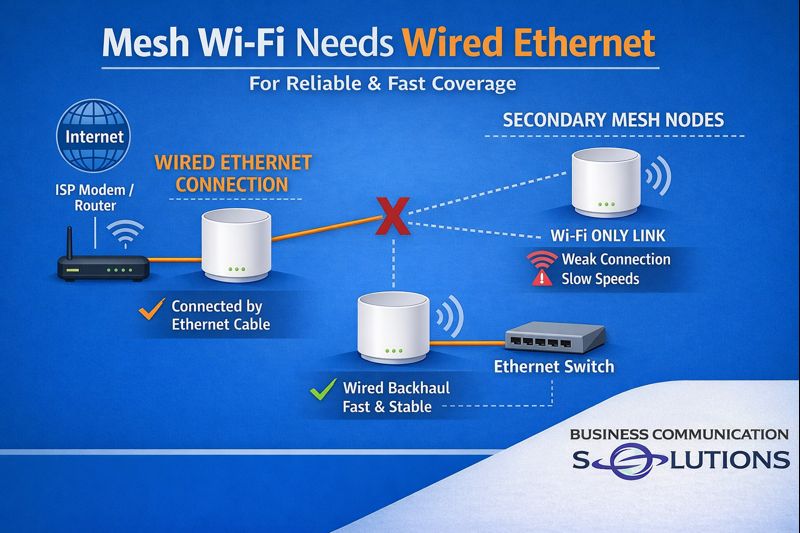
Mesh Wi-Fi systems are popular with homeowners across Austin, TX because they promise better coverage and fewer dead zones. Many people install mesh Wi-Fi hoping to fix slow internet, buffering, or unreliable connections. What most homeowners don’t realize is this: Mesh Wi-Fi performs best when it’s supported by Ethernet cabling inside the home. Mesh Wi-Fi Coverage vs Performance Mesh systems improve coverage by placing multiple access points throughout the house. However, when those access points communicate wirelessly (called wireless backhaul), they share bandwidth with your devices. This often leads to: Slower speeds on remote nodes Lag during video calls and gaming Inconsistent performance for smart TVs Wi-Fi interference from neighboring homes In many Austin homes — especially two-story houses, brick construction, or homes with detached buildings — wireless backhaul can only do so much. Ethernet Backhaul: The Real Upgrade By installing Ethernet cabling for mesh Wi-Fi, access points communicate over a wired connection instead of Wi-Fi. This provides: Faster and more stable internet speeds Lower latency for work-from-home and gaming Better reliability for streaming and smart devices Full performance from your internet service This setup is known as wired backhaul, and it makes a noticeable difference immediately. Why Austin Homes Benefit from Wired Mesh Systems Homes in the Austin area often include: Multiple floors and long layouts Stone, brick, or metal framing Detached garages, studios, or backyard offices A growing number of connected devices Ethernet cabling eliminates many of the obstacles Wi-Fi struggles with, delivering consistent performance throughout the home. Best Places to Install Ethernet for Mesh Wi-Fi We commonly install Ethernet cabling in Austin homes for: Home offices Living rooms and TV areas Upstairs hallways Game rooms Detached buildings and guest houses Even adding two or three wired access points can dramatically improve Wi-Fi across the entire house. Future-Proofing Your Home Network Installing network cabling isn’t just about today’s Wi-Fi. It prepares your home for: Faster internet speeds New Wi-Fi standards Smart home devices Remote work and online learning Increased home value Once Ethernet is installed, it supports your network for years to come. Professional Home Network Cabling in Austin, TX At Business Communication Solutions, we provide home network cable installation in Austin and surrounding areas, including: Cedar Park, Round Rock, Pflugerville, Leander, Georgetown, Bee Cave, Lakeway, and nearby cities. We help homeowners with: Ethernet installation for mesh Wi-Fi systems Access point cabling Clean cable routing and testing Upgrades for existing homes and remodels Call a Local Austin Network Cabling Expert If your mesh Wi-Fi still isn’t delivering the performance you expect, Ethernet cabling may be the missing piece. 📞 Business Communication Solutions 📍 Austin, TX 📞 512-257-1433 Talk to a local installer who understands Austin homes and real-world network performance.
UniFi Install Help for People Who Love UniFi (But Don’t Want the Headache)

If you’re a UniFi fan, you already know—this gear is awesome. Clean dashboards, powerful features, rock-solid performance… when it’s set up right. But running cable, mounting APs, dialing in settings, and figuring out why Wi-Fi drops in one corner of the building? That part gets old fast. That’s where we come in. At Business Communication Solutions, we help UniFi users get everything installed, mounted, and programmed without the stress. We Handle the Physical Stuff (So You Don’t Have To) You buy the UniFi gear. We make it look and work right. We help with: Cat6 / Cat6A cabling Fiber runs between buildings Clean cable management Network racks and PoE switches Got a main house + guest house, office + warehouse, or back building that needs solid internet? We’ll connect it properly—no Wi-Fi hacks or janky extenders. UniFi Access Point Mounting & Wi-Fi Fixes UniFi APs are great… unless they’re: Mounted in the wrong spot Turned up too high Stepping on each other’s channels We handle: Ceiling & wall mounting Proper AP placement Channel and power tuning Killing dead zones once and for all Homes, offices, restaurants, metal buildings—we’ve seen it all. UniFi Cameras & Protect Setup (Clean and Simple) Already running UniFi Protect or planning to? We can: Mount UniFi cameras (inside & outside) Run PoE cabling cleanly Set up recording, alerts, and remote viewing No loose wires. No half-working cameras. Just a setup that actually does what it’s supposed to. UniFi Setup, Programming & “Please Fix This” Support If you’ve ever said: “It kinda works but not great” “I followed a YouTube video and now nothing works” “Why does Wi-Fi drop when I walk across the building?” Yeah… we help with that. We can: Set up your UniFi controller or gateway Create guest Wi-Fi Segment networks Lock things down properly Troubleshoot weird issues Whether you want full control or just want it to work, we meet you where you are. Why UniFi Users Call Us We actually know UniFi We’re local (real people, real installs) We help homes and businesses We work with DIY UniFi users Clean installs, no shortcuts You don’t need a giant MSP. You just need someone who gets UniFi. Serving UniFi Users Around Austin We help UniFi users in Austin and nearby areas like Round Rock, Cedar Park, Pflugerville, Leander, Georgetown, Kyle, Buda, and more. Ready to Make Your UniFi Network Awesome? If you love UniFi but don’t want to deal with the install headaches, give us a call. 📞 Business Communication Solutions – 512-257-1433 We’ll help you get your UniFi network dialed in—clean, fast, and done right.